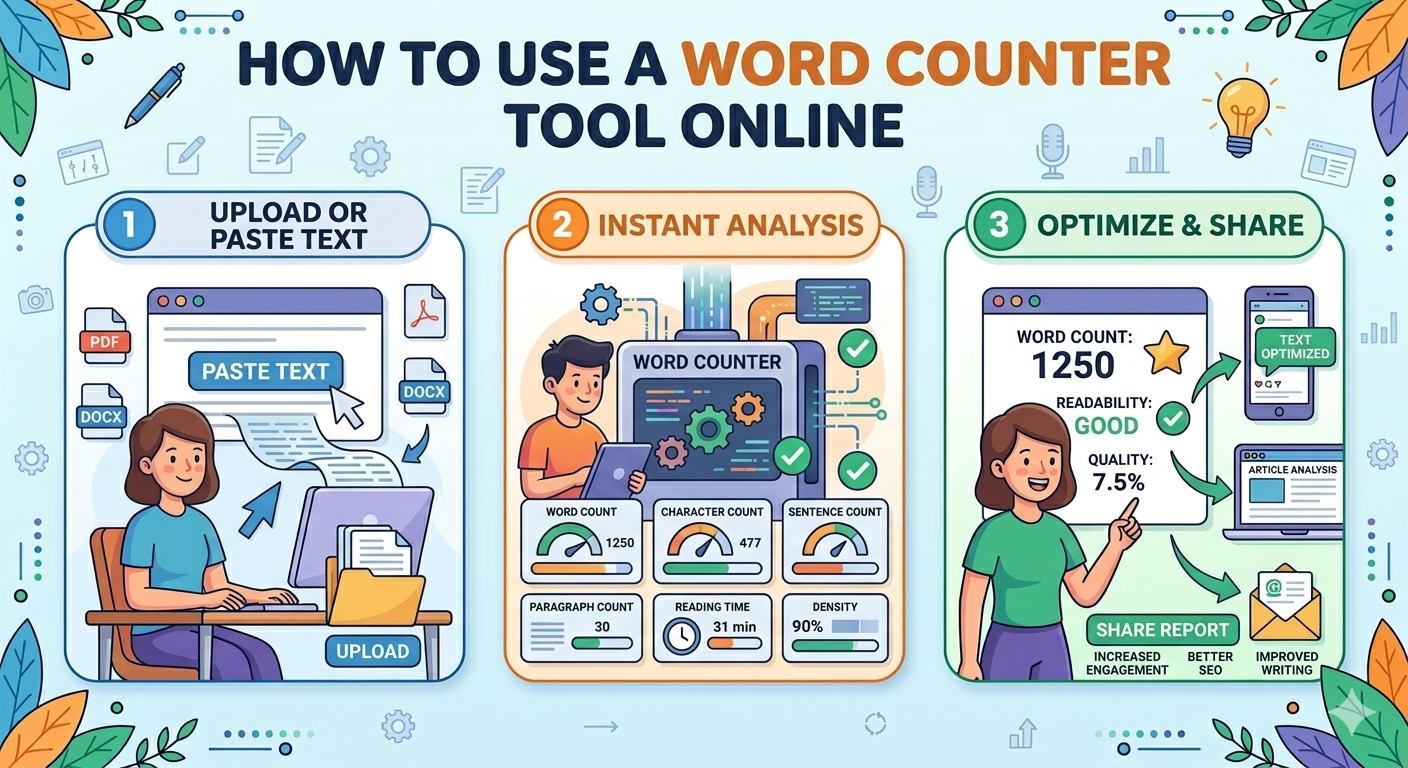
How to Use a Word Counter Tool Online
Benefits of Using an Online Word Counter
Introduction
Writing content for blogs, essays, assignments, or social media often requires a specific word limit. Many platforms and teachers require content to meet a minimum or maximum number of words. A Word Counter Tool helps you quickly count the number of words, characters, sentences, and paragraphs in your text.
Instead of counting words manually, an online word counter can do the job instantly. These tools are fast, accurate, and easy to use for students, bloggers, writers, and professionals.
In this guide, you will learn how to use a word counter tool step by step and why it is useful for everyday writing tasks.
What Is a Word Counter Tool?
A Word Counter Tool is an online utility that calculates the number of words in a text. It can also show other useful statistics such as:
-
Character count
-
Sentence count
-
Paragraph count
-
Reading time
-
Keyword density
These features help writers improve their content and ensure it meets required word limits.
Why Do You Need a Word Counter Tool?
Many situations require you to know the exact word count of your text. A word counter tool makes this process quick and easy.
Here are some common reasons to use a word counter:
Academic Writing
Students often need to follow strict word limits for essays, reports, and assignments.
Blogging and SEO
Bloggers and website owners use word counters to maintain the ideal length for SEO-friendly articles.
Social Media Posts
Platforms like Twitter or LinkedIn sometimes have character limits.
Professional Writing
Writers, journalists, and editors use word counters to track content length.
Benefits of Using an Online Word Counter
Fast and Accurate
Online word counters instantly calculate the total words in your content.
No Software Required
You can use the tool directly from your web browser without installing any software.
Easy to Use
Most word counter tools have a simple interface that anyone can use.
Multiple Text Statistics
Besides word count, many tools also provide character counts and reading time estimates.
How to Use a Word Counter Tool (Step-by-Step)
Using a word counter tool is very simple. Follow these steps:
Step 1: Open the Word Counter Tool
Visit the word counter tool on your preferred website or online tools platform.
Step 2: Type or Paste Your Text
In the text box provided, either type your content or paste the text you want to analyze.
Step 3: View Word and Character Count
Once the text is entered, the tool will automatically display:
-
Total words
-
Character count
-
Sentences
-
Paragraphs
The results usually update in real time.
Step 4: Edit Your Text
If your content exceeds the word limit, you can edit it directly inside the tool to reduce the number of words.
Step 5: Copy or Download the Text
After finishing your edits, you can copy the final text and use it for your blog, assignment, or document.
Features of a Good Word Counter Tool
A high-quality word counter tool should offer several useful features, including:
Real-Time Word Count
The word count updates automatically as you type.
Character Counter
Shows both characters with spaces and without spaces.
Sentence and Paragraph Count
Helps writers structure their content better.
Reading Time Estimation
Estimates how long it will take readers to finish the content.
Simple Interface
A clean and user-friendly design improves usability.
Tips for Writing the Perfect Word Count
Here are some tips to maintain the ideal word length for your content.
Focus on Quality
Do not add unnecessary words just to increase the word count.
Use Clear and Simple Language
Simple sentences make your content easier to read.
Edit and Remove Repetition
Avoid repeating the same idea multiple times.
Break Content into Sections
Using headings and subheadings improves readability.
Who Can Use a Word Counter Tool?
Word counter tools are useful for many types of users.
Students
Students can ensure their assignments meet required word limits.
Bloggers
Bloggers can create SEO-friendly articles with the ideal length.
Content Writers
Professional writers use word counters to track content size.
Social Media Managers
They can check character limits before publishing posts.
Frequently Asked Questions (FAQ)
Is a word counter tool free?
Yes, most online word counter tools are completely free to use.
Can a word counter show character count?
Yes, many word counters display both word count and character count.
Do word counter tools work on mobile devices?
Yes, online word counter tools work on smartphones, tablets, and computers.
Is it safe to paste text in a word counter tool?
Most reputable tools do not store or share your text, making them safe to use.
Conclusion
A Word Counter Tool is a simple but powerful utility that helps writers track the length of their content quickly and accurately. Whether you are writing an academic essay, blog post, or social media update, knowing the exact word count is essential.
By using an online word counter tool, you can save time, improve writing efficiency, and ensure your content meets the required word limits.
If you regularly write content online, a word counter tool is an essential tool that can make your work easier and more organized.