How to Use an Image Resizer Tool Online
Benefits of Using an Online Image Resizer
Introduction
Images are important for websites, social media, and documents. However, large images can slow down websites and take up unnecessary storage space. An Image Resizer Tool helps you quickly change the width and height of an image without losing quality.
In this guide, you will learn how to easily resize images using an online image resizer tool.
What Is an Image Resizer Tool?
An Image Resizer Tool is an online utility that allows users to change the dimensions of an image. Instead of editing images in complex software, you can resize images directly in your browser.
These tools are commonly used for:
-
Website images
-
Social media posts
-
Email attachments
-
Online forms and documents
Benefits of Using an Image Resizer Tool
1. Faster Website Loading
Smaller images load faster, improving website performance.
2. Saves Storage Space
Resized images take less storage space on your device or server.
3. Perfect for Social Media
Each platform requires different image sizes.
4. Easy to Use
Most tools work in just a few clicks.
How to Use an Image Resizer Tool
Follow these simple steps to resize your image.
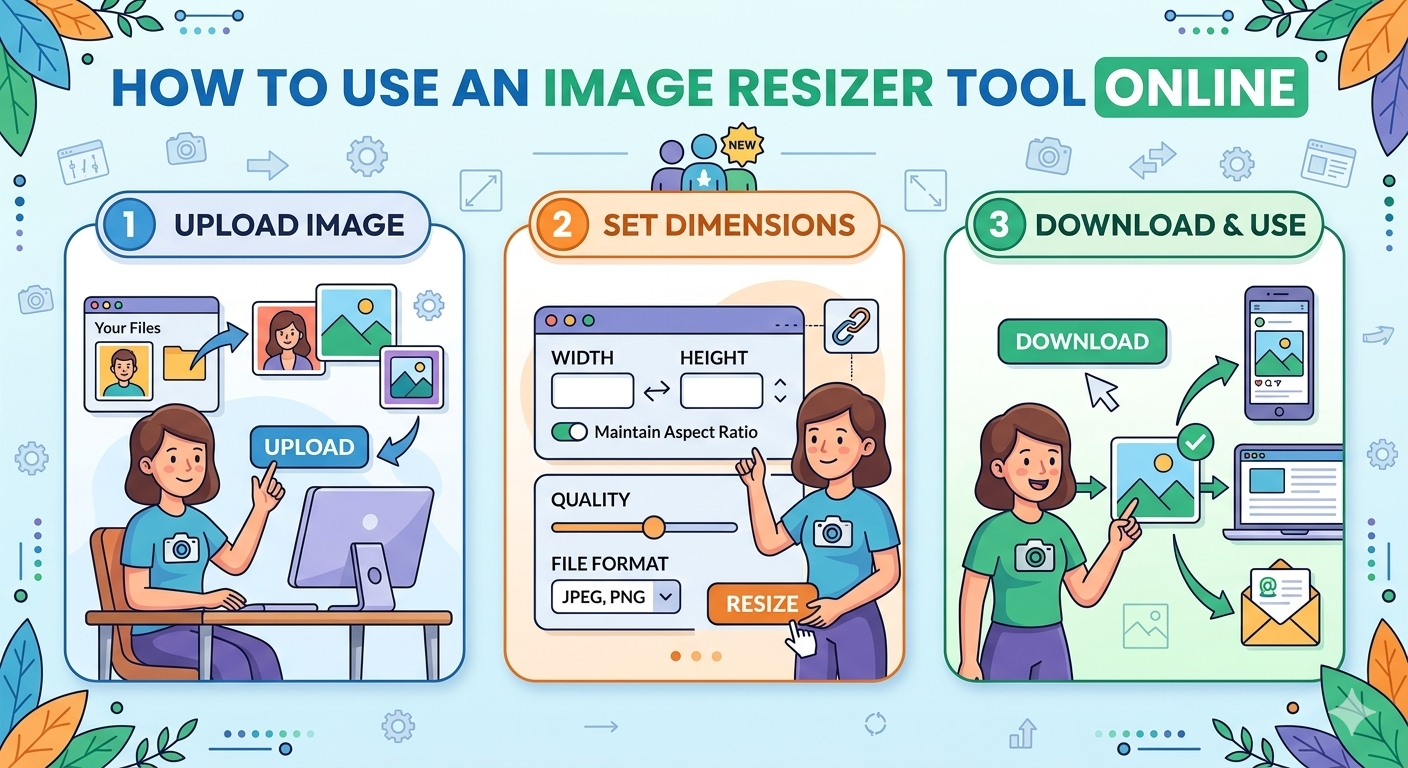
Step 1: Upload Your Image
Open the Image Resizer tool and click Upload Image.
Select the image file from your device.
Supported formats usually include:
-
JPG
-
PNG
-
WEBP
Step 2: Set Image Size
Enter the width and height you want.
Some tools also allow:
-
Percentage resize (50%, 75%, etc.)
-
Custom dimensions
Step 3: Keep Aspect Ratio
Enable Keep Aspect Ratio to prevent the image from stretching or becoming distorted.
Step 4: Resize the Image
Click the Resize Image button.
The tool will automatically process your image.
Step 5: Download the Image
Once resizing is complete, click Download to save the resized image.
Tips for Best Image Quality
To maintain high image quality, follow these tips:
-
Do not enlarge very small images.
-
Use PNG for graphics and logos.
-
Use JPG for photos.
-
Keep aspect ratio enabled.
Common Uses of Image Resizing
Website Optimization
Websites require properly sized images for faster loading.
Social Media Posts
Resize images for platforms like:
-
Facebook
-
Instagram
-
Twitter
-
LinkedIn
Email Attachments
Smaller images reduce email size and upload time.
Why Use an Online Image Resizer?
Online image resizers are convenient because:
-
No software installation required
-
Works on any device
-
Fast and simple
-
Completely free in many cases
Conclusion
An Image Resizer Tool is a simple but powerful utility that helps you quickly adjust image dimensions for websites, social media, and documents. By resizing images properly, you can improve website speed, save storage, and maintain professional-quality visuals.
If you frequently work with images, using an online image resizer can save time and effort.